


Small Business Website Design: What Actually Matters
The difference between a pretty website and one that generates leads isn't budget. It's strategy. Here's what your small business website actually needs to work.
TL;DR
A website that doesn't generate leads is an expensive business card. What actually matters: 5 core pages, PageSpeed 90+, mobile-first design, real trust signals, and a clear conversion path on every page. Pretty is optional. Profitable is the goal.

On this page
If a page doesn’t help someone decide to call you, it doesn’t go live. That’s my rule. Your website isn’t a digital brochure. It’s a 24/7 salesperson. Let me show you what that actually means.
The Difference Between a Website and a Revenue Machine
I’ve seen $15,000 websites that don’t bring in a single customer. I’ve also seen $3,000 websites that generate $50,000 in annual revenue. The difference isn’t the budget. It’s the strategy.
75% of consumers judge a business’s credibility based on its website design, according to Stanford Web Credibility Research. That first impression happens in under a second. If your site doesn’t immediately communicate what you do, who you help, and why to trust you, visitors leave.
The question that should drive every decision on your website: “Does this help someone decide to call me?” If the answer is no, it’s clutter. This guide covers what to keep, what to cut, and what every small business website actually needs to generate leads.
The 5 Pages Every Small Business Website Needs
You don’t need 50 pages. You need 5 that work.
1. Homepage
Your homepage has one job: convince someone who’s never heard of you to keep reading.
It needs a clear value proposition in the first 5 seconds, trust signals (reviews, photos of real work, credentials) above the fold, and one obvious call to action. The most common mistake I see: business owners try to say everything on the homepage instead of one thing well.
Pick the single most important thing you want a visitor to do, call, book a consultation, request a quote, and make that impossible to miss. Everything else is secondary.
2. Services or Products Page
Visitors who land on your homepage and want to know more will click to your services page next. This is where most websites lose them.
Your services page needs to be benefit-focused, not feature-focused. Customers don’t care that you “offer complete HVAC services.” They care that you’ll fix their broken furnace today and charge a fair price.
Include pricing, even if it’s just “starting at $X.” Hiding pricing creates friction. The people who leave because your prices are too high were never going to buy anyway. Show a clear path to action from every service description.
3. About Page
The biggest mistake on About pages: making them about you instead of about how you help your customers.
Yes, tell your story. Yes, share your credentials and how long you’ve been in business. But frame everything through the lens of why it matters to the person reading it. “I’ve been doing this for 15 years” is fine. “I’ve been doing this for 15 years, which means I’ve seen the mistake your previous contractor made, and I know exactly how to fix it” is better.
Human connection is the goal. People buy from people they trust.
4. Contact Page
Make it impossible to not contact you.
That means multiple options: phone number (click-to-call on mobile), email, and a contact form. It means your business hours. It means your physical address if you have one. It means a form that’s short enough to actually complete.
The most common contact page mistake: a form with 10 required fields. Name, phone, and a brief description of what they need. That’s it. You can get the rest on the call.
5. Local Landing Pages
If you serve multiple cities, you need a dedicated page for each one. Not a page that just swaps the city name into the same template. A real page with specific content about that market, local testimonials, and relevant details about working in that area.
Local landing pages are how you show up in Google when someone in a specific city searches for your service. One strong local page can generate leads from that city indefinitely.
A real example: Best Construction Brands in Colorado Springs has 4 core pages: Home, Services, About, and Contact. That’s it. With solid SEO layered on top, they went from #13 to #2 on Google Maps in 60 days and now generate 25 measurable leads per month from organic search. You don’t need complexity. You need clarity. See their case study
What Your Visitors Actually Want (Hint: It’s Not What You Think)
Here’s what visitors are actually asking when they land on your site:
- Can you solve my problem?
- What does it roughly cost?
- Can I trust you?
- How do I contact you?
- Have you done this for someone like me?
That’s it. Five questions. Most small business websites answer none of them clearly.
What business owners often want on their websites: beautiful visuals, all services listed prominently, full company history, awards and accolades, detailed background on the founding team.
None of that is wrong. It’s just incomplete without the visitor’s questions answered first.
The 5-Second Test: Cover your screen with your hand, uncover it, and give yourself 5 seconds to answer three questions: What does this business do? Who do they serve? Why should I trust them?
If you can’t answer all three in 5 seconds, your homepage needs work. Ask a friend who doesn’t know your business to take the same test. Their answers will tell you more than any analytics dashboard.
The goal isn’t a beautiful website. The goal is a website that makes a stranger feel confident enough to call you. Those two things are not the same thing. They can overlap, but beauty without clarity doesn’t generate leads.
If Your Website Is Slow, You’re Losing Business. Full Stop.
A 1-second delay in page load time reduces conversions by 7%, according to Google and Deloitte research. 53% of mobile visitors leave if a page takes more than 3 seconds to load. And Google uses page speed as a ranking factor, which means a slow site ranks lower and converts less at the same time.
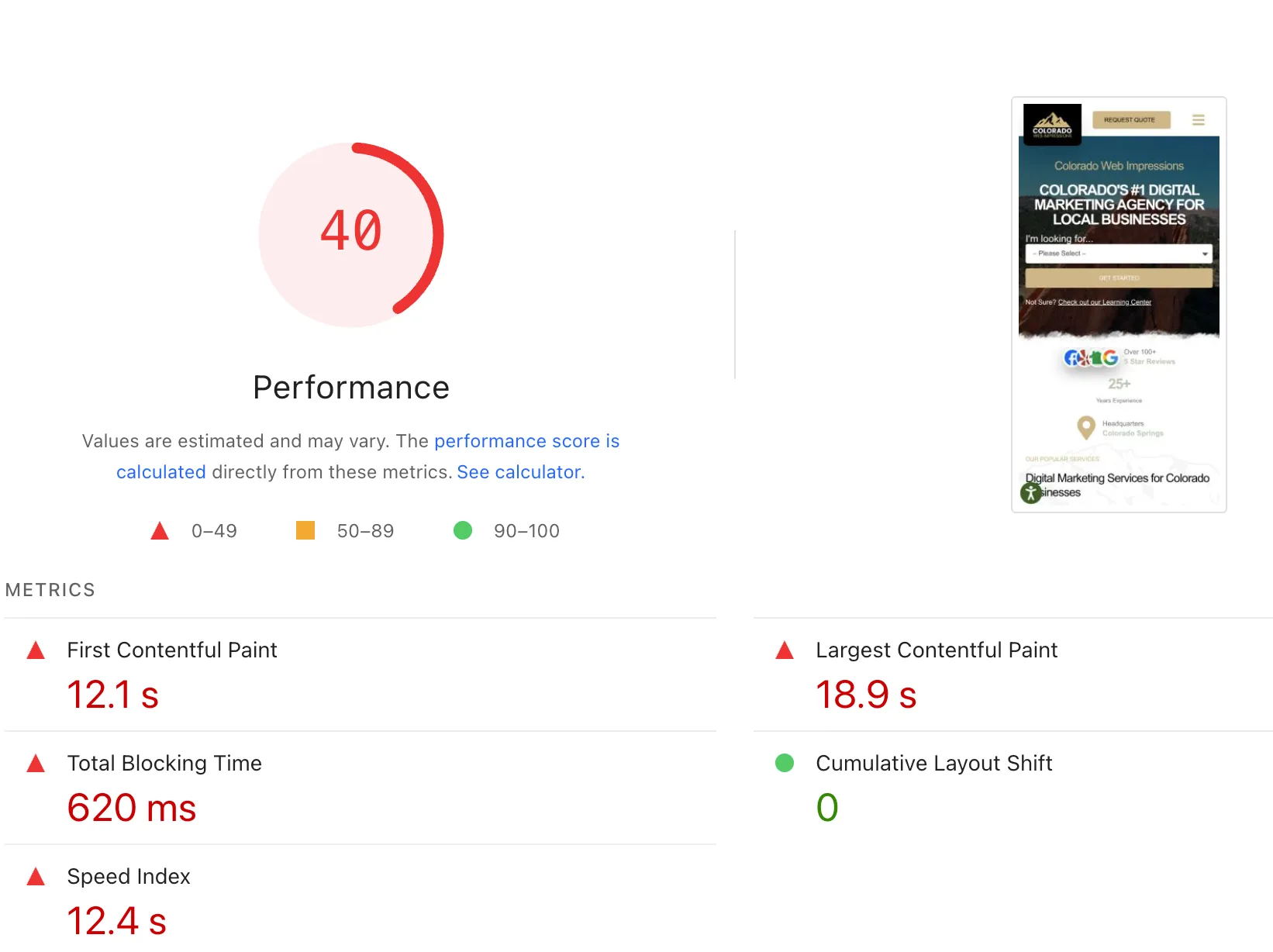
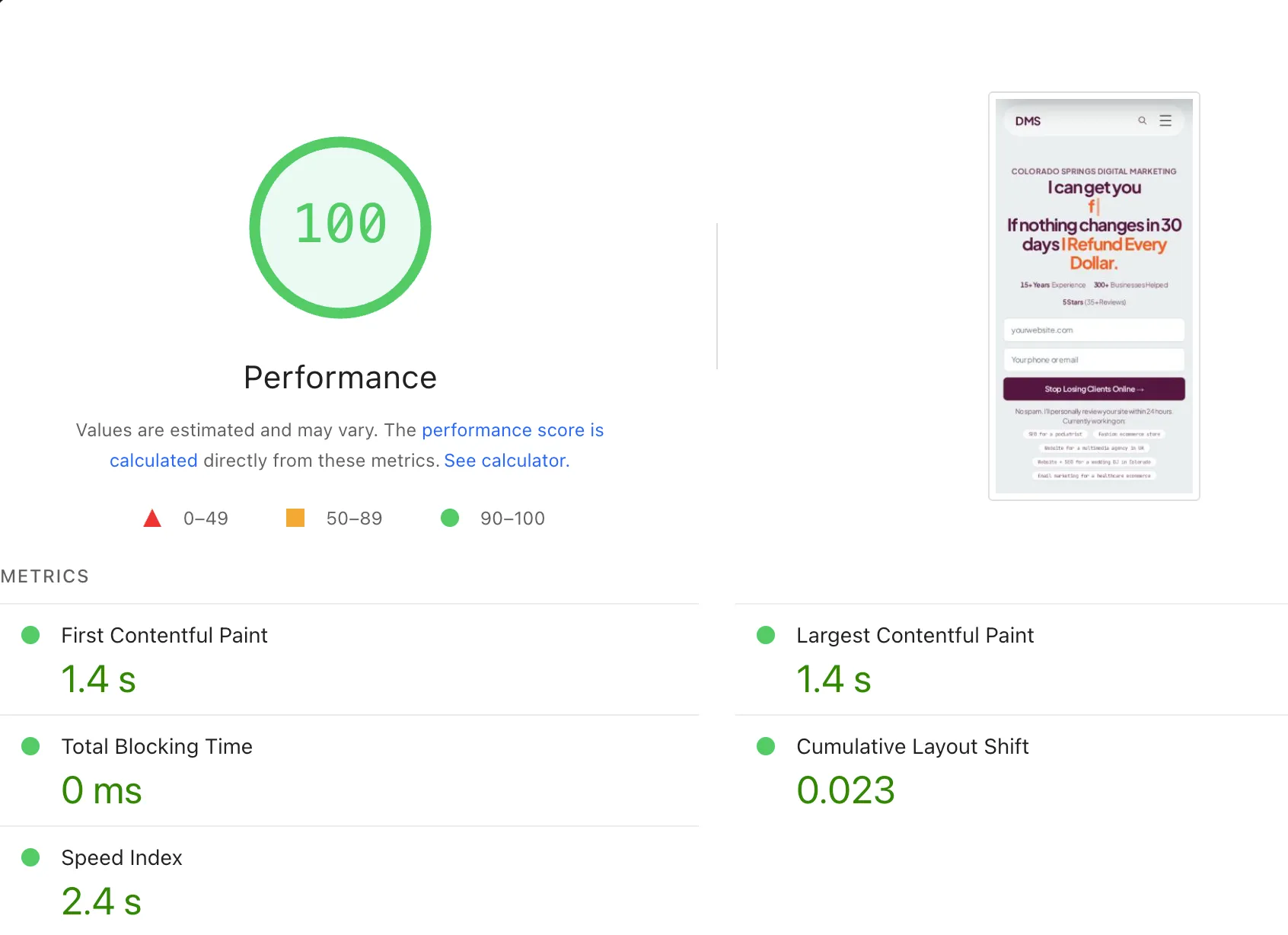
I aim for a PageSpeed score of 96 or higher. 90+ is the acceptable floor. Most small business websites I audit score between 40 and 60. That range is actively costing them both rankings and customers.
What causes slow websites:
Bloated page builders like Elementor and Divi load dozens of scripts regardless of what you’re actually using on a given page. Unoptimized images, often uploaded straight from a phone camera, add unnecessary weight. Too many plugins stack on top of each other. And cheap hosting throttles performance during traffic spikes.
A real example: When I rebuilt Tycoon Games’ e-commerce site, the result was all green Core Web Vitals across the board. Within 5 months, they had 7,500+ monthly organic visitors and had completely eliminated $28,800 in annual paid advertising. Fast sites rank better. Fast sites convert better. Speed matters more than any design decision you’ll make. Full case study
If you want to check your own site, run it through Google’s free PageSpeed Insights tool right now. The results may surprise you.
For more on the connection between speed and SEO, read my post on website design mistakes that kill your search rankings. Speed shows up as the #1 culprit in nearly every audit I run.
Your Visitors Are on Their Phones. Is Your Site Ready?
More than 60% of web traffic comes from mobile devices. Google uses mobile-first indexing, which means your site is evaluated and ranked based on its mobile version, not the desktop version you probably designed it on.
What mobile-first actually means in practice:
Tap targets need to be large enough for a thumb. A small “call now” button that requires a precise finger tap fails on mobile. Buttons and links need padding around them.
Text needs to be readable without pinching to zoom. If a visitor has to zoom in to read your services list, they’re gone.
Click-to-call is non-negotiable. Your phone number should be a link that opens the phone dialer directly. Every single time. On every page.
Forms need to work with a thumb. Single-column layouts, large input fields, and minimal required fields. The harder it is to fill out a form on mobile, the fewer forms get submitted.
Go to your website on your phone right now. Try to call yourself. Try to fill out your contact form. Try to navigate your services page with one hand. If anything frustrates you, it’s frustrating your customers too.
The Trust Elements That Turn Visitors Into Customers
Visitors don’t know you. Their default assumption is skepticism. Your website’s job is to overcome that skepticism before they ever talk to you.
The trust signals that actually move the needle:
Real testimonials from real customers. Not “Great service!” from J.S. Full name, ideally a photo, specific detail about what they hired you for and what happened. Specificity is what makes testimonials believable.
Photos of actual work. Stock photos of generic smiling people in hard hats don’t build trust. Photos of your actual crew, your actual completed projects, your actual before-and-after results do.
Credentials and certifications. If you’re licensed, bonded, or certified, say so and put the logos near your calls to action. In industries where licensing matters (contractors, healthcare, legal, financial), this directly affects whether someone picks up the phone.
HTTPS security. A padlock in the browser bar. If your site still loads as “http://” without the S, that’s a red flag to both visitors and Google.
Physical address. A real street address tells visitors you’re a real business. Especially important for local service businesses where trust is tied to proximity.
Years in business. “Serving Colorado Springs since 2009” communicates stability, experience, and staying power in one short phrase.
Place these signals near the top of your homepage, near your calls to action, and just before contact forms. That’s where visitors make their decision.
A real example: For TriumpHealth in Texas, I rebuilt their website to reflect the actual caliber of their work. The site now earns 1,004 organic keyword rankings with 66% organic traffic growth year over year. But the trust signals built into the design did something rankings alone can’t: they convinced visitors to submit consultation requests instead of just reading and leaving. Full case study
Why Website Quotes Range from $500 to $50,000 (And What Actually Drives the Cost)
The price range for a small business website is genuinely wide, and the variation is real. Here’s what’s behind it.
Template or DIY builds ($500-$1,500): Platforms like Wix, Squarespace, and WordPress with a free theme. Quick to set up, limited customization, almost always missing an SEO foundation. These can work for very early-stage businesses that need an online presence while they figure out the rest. They rarely generate consistent leads.
Custom template builds ($1,500-$5,000): A premium theme or template configured and customized by a professional. This is the sweet spot for most small businesses. Done well, it delivers a professional site with real performance and SEO built in. Done poorly, it’s just an expensive template.
Fully custom builds ($5,000-$15,000+): Built from scratch for your specific needs. This level makes sense when your business has complex requirements, when you need a specific conversion flow that templates can’t deliver, or when performance and competitive SEO advantage are the priority from day one.
What you’re actually paying for at any level above DIY: strategy and planning, custom design, performance optimization, SEO foundation, proper site structure, and some form of ongoing support.
The hidden costs of going cheap:
No SEO foundation means you’re starting with a site that Google can’t easily read. Poor performance means rankings and conversions both suffer. Some budget platforms hold your content hostage, charging monthly to keep accessing a site you paid to build. And when you eventually need to redo it (and you will), you pay twice.
What to prioritize at any budget: PageSpeed 90+, mobile-first design, a clear conversion path on every page, you own the code outright, and basic on-page SEO done correctly from the start.
A real example: Tasoro Products needed to turn a wholesale building materials product catalog into a lead-generating platform. The redesigned site now ranks for 240+ organic keywords across California markets and generates actual quote requests instead of anonymous page views. Full case study
For a deeper breakdown of pricing, I cover this in detail in my website cost guide.
Do You Actually Own Your Website? (This Question Matters More Than You Think)
“Owning” your website means: you have the code files, you control the hosting account, you can move the site to a different host whenever you want, and there are no ongoing fees required just to access what you paid to build.
Red flags that mean you don’t own your site:
Someone says you’re on a “proprietary platform” that can’t be exported. You pay a monthly fee to keep your “website access” active. You can’t get login credentials to your own hosting account. Your web person has said they’ll “keep it for you.”
I’ve talked to business owners paying $300 per month indefinitely because they don’t technically own what they paid to build. That’s $3,600 per year for something that should have been a one-time investment.
My policy with every website I build: you own everything. The code, the content, the designs, the domain. All yours. If we stop working together tomorrow, you take everything with you and host it wherever you want. No proprietary system, no monthly hostage fee.
When you’re talking to any web designer or agency, ask this question directly: “If I leave, can I take my code files and move the site to my own hosting?” If the answer is anything other than a clear yes, keep looking.
Before You Launch: The Small Business Website Checklist
Use this before any new site goes live, or before you decide whether your current site needs a redesign.
Must Have:
- Clear value proposition on homepage (visible without scrolling)
- Mobile-responsive design (tested on an actual phone)
- PageSpeed 90+ on both mobile and desktop
- Contact information on every page
- Click-to-call phone number link
- HTTPS security (padlock in browser bar)
- Fast hosting (shared hosting is usually fine, ultra-cheap shared is not)
- You own the code and can move it anytime
Nice to Have:
- Blog for long-term SEO
- Online booking or scheduling
- Live chat or contact widget
- FAQ section (helps with both trust and SEO)
- Video showing your work or process
Avoid:
- Stock photos as the primary imagery throughout the site
- Contact information buried on a single hard-to-find page
- Auto-playing video or audio
- Walls of unbroken text
- “Click here” buttons (use specific anchor text like “Request a Free Quote” instead)
Frequently Asked Questions About Small Business Website Design
What pages does a small business website need?
Most small businesses need 5 core pages to start: Homepage, Services or Products, About, Contact, and at least one local landing page for each city you serve. You don’t need 50 pages. You need 5 that work. Add more only when you have a clear reason for each new page.
How much does a small business website cost?
Template and DIY builds typically run $500-$1,500. Custom template work ranges from $1,500-$5,000. Fully custom sites built for performance and SEO start around $5,000 and go up from there depending on complexity. The better question is what you lose every month with a site that doesn’t generate leads. I’ll cover this in much more detail in my website cost guide.
Why is website speed important for small businesses?
A 1-second delay reduces conversions by 7%. 53% of mobile visitors leave if a page takes more than 3 seconds to load. Google uses page speed as a ranking factor. A slow site ranks lower and converts less at the same time. It’s a double penalty you don’t have to accept.
Should I use a template or custom design for my small business website?
A template works well if it’s implemented correctly with a real SEO foundation, fast performance, and a clear conversion path. The problem isn’t templates. It’s templates deployed without any strategy. A well-built $3,000 custom template site will outperform a $15,000 custom build that has slow load times and no SEO foundation.
How do I know if my website is mobile-friendly?
Go to your website on your phone right now. Can you read the text without zooming in? Can you tap the contact button comfortably with your thumb? Does your phone number link directly to a call? Can you fill out the contact form with one hand? If any of those fail, you have a mobile problem. For more detail, Google’s Mobile-Friendly Test tool is free and gives specific recommendations.
Do I need a blog on my business website?
Not immediately. Get your core 5 pages working and generating leads first. A blog is a long-term SEO investment that takes 6-12 months to produce measurable results. It works, and it’s worth doing, but it’s not a priority until your conversion foundation is solid. For more on this, see my SEO guide for small businesses.
What makes a website trustworthy to visitors?
Real testimonials with full names and specific details. Photos of actual work rather than stock imagery. Credentials, licenses, and certifications displayed near calls to action. A physical address. HTTPS security. Years in business. Place these elements where visitors make decisions: above the fold on the homepage, near contact forms, and before any call to action.
Should I include pricing on my website?
Yes. Even “starting at $X” is better than nothing. Hiding pricing creates friction and signals you might have something to hide. Visitors who leave because your prices are too high were never going to become customers anyway. Showing price ranges filters your leads for you, which saves time on both sides.
How often should I update my website?
Review your core pages every 6-12 months. Update testimonials as you collect new ones. If you have a blog, post when you have something genuinely useful to say, not on a fixed schedule for its own sake. Your services and pricing should be reviewed whenever something changes in your business. Google notices stale content; so do visitors.
What’s the difference between website design and website redesign?
A new website starts from nothing. A redesign takes an existing site and rebuilds it for better performance, conversion, and SEO. If your current site has reasonable content but is slow, outdated, hard to navigate on mobile, or simply not generating leads, a redesign is often faster and less expensive than starting over. I offer both. You can learn more at my website design service page or website redesign page.
Is Your Website Working for You, or Against You?
Most small business websites I look at aren’t bad. They’re just incomplete. They look fine but don’t answer the 5 questions visitors actually have. They load slowly enough to cost rankings. They’re built for desktop on a mobile-first internet. They generate visitors but not calls.
That gap between “looks fine” and “generates leads” is exactly what I work on.
I offer a free website audit that reviews your PageSpeed score, mobile experience, conversion path, and overall lead generation potential. No pitch, just an honest look at what’s working and what’s not.
If your website isn’t generating the leads your business needs, request your free audit. I’ll tell you exactly what I’d fix and why. And if your site is already performing well, I’ll tell you that too.
Ready to see what a website built for revenue looks like? See my web design services.
Frequently Asked Questions
Most small businesses need 5 core pages: Homepage, Services or Products, About, Contact, and at least one local landing page for each city you serve. You don't need 50 pages. You need 5 that work.
Template builds typically run $500-$1,500. Custom template work ranges from $1,500-$5,000. Fully custom sites built for performance and SEO start around $5,000 and go up from there. The question isn't what it costs up front. It's what you lose every month with a site that doesn't generate leads.
A 1-second delay reduces conversions by 7%. Google uses page speed as a ranking factor. Slow sites rank lower and convert less. You're losing business on both ends.
A template works fine if it's implemented correctly with a real SEO foundation, fast performance, and a clear conversion path. The problem isn't templates. It's templates deployed without strategy.
Pull up your site on your phone right now. Can you read the text without zooming? Can you tap the contact button easily with your thumb? Does the phone number link directly to a call? If the answer to any of those is no, you have a problem.
Not right away. Get your core 5 pages working first. A blog is a long-term SEO investment. It works, but it takes 6-12 months to see real results. Prioritize the pages that convert visitors today.
Real testimonials from real customers, photos of actual work (not stock images), credentials and certifications, a physical address, HTTPS security, and years in business displayed prominently near your calls to action.
Yes, even if it's just 'starting at.' Hiding pricing frustrates visitors and signals you might have something to hide. 'Starting at $X' sets expectations and filters out leads who can't afford you anyway. That's good, not bad.
Review your core pages every 6-12 months. Update testimonials as you get new ones. If you have a blog, post when you have something genuinely useful to say. Frequency for its own sake doesn't help.
A new website starts from scratch. A redesign takes an existing site and rebuilds it for better performance, conversion, and SEO. If your current site has good bones but is slow, outdated, or not generating leads, a redesign is often faster and less expensive than starting over.